
This is an old revision of the document!
ProtoTone Synth
Author
Antoniu Florea | 331 CB
Introduction
ProtoTone Synth is a musical instrument based on the widely popular Stylophone. You can play musical notes by touching the copper pads with a stylus and manipulate them in real time.
You can do wavy pitch bends, add modulation or vibrato, switch up the octave and see the currently playing note on the screen.
I wanted to create something that has to do with music because this is what I am passionate about, and I never used a Stylophone, so it made perfect sense to just make my own. This will be a great demonstration of analogue signals, audio generation, digital control and communication with external devices.
At the end, it will be a fully functioning musical instrument, which will be possible to be customized even further by anyone willing.
General Description
Block Diagram
Modules
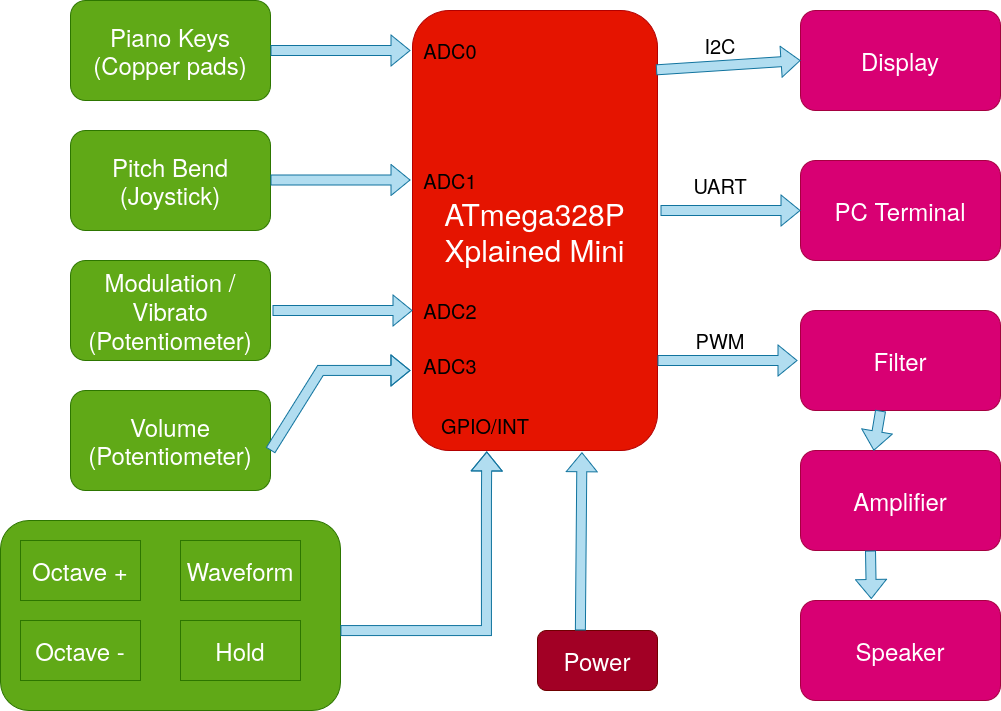
Based on the key pressed, the microcontroller will output a different musical note and it will be shown on the display. The musical note can be pitched up or down using the joystick, which is just a potentiometer that returns to the neutral position. With the twisting of the Modulation potentiometer, the note will begin to jitter consistenly based on the frequency set. The volume will also be able to be adjusted by twisting yet another potentiometer. At the end, we are left with the actions of the 4 buttons. Two are for choosing the octave, going both ways. Another is for holding the current note, letting you lift the stylus off the key and it would still play, and the last one is for cycling through waveforms. You can choose between square, saw and triangle.
The display will output the current note playing, the current octave for a short period of time when changing it in any way, and the current waveform when cycling.
UART is used for debugging via the computer terminal.
The speaker brings it all together by (hopefully) making the desired sounds.
Hardware Design
Components
| Component | Quantity |
|---|---|
| ATmega328P Xplained Mini | 1 |
| proto PCB 9×15 cm | 1 |
| OLED I2C SSD1306 | 1 |
| analogue Joystick | 1 |
| PAM8403 module | 1 |
| 4 Ohm Speaker | 1 |
| Potentiometer 10k | 3 |
| Buttons | 4 |
| LEDs | 3 |
| Resistors | plenty |
| Capacitors | plenty |
| Dupont wires | 1 set |
| Hard wires for soldering | 1 set |
| Copper tape | 1 roll |
Schematic
Software Design
- mediu de dezvoltare (if any) (e.g. AVR Studio, CodeVisionAVR)
- librării şi surse 3rd-party (e.g. Procyon AVRlib)
- algoritmi şi structuri pe care plănuiţi să le implementaţi
- (etapa 3) surse şi funcţii implementate
Rezultate Obţinute
Concluzii
Download
 .
.
Fişierele se încarcă pe wiki folosind facilitatea Add Images or other files. Namespace-ul în care se încarcă fişierele este de tipul :pm:prj20??:c? sau :pm:prj20??:c?:nume_student (dacă este cazul). Exemplu: Dumitru Alin, 331CC → :pm:prj2009:cc:dumitru_alin.
Jurnal
Bibliografie/Resurse


