
This is an old revision of the document!
B.A.U.B.A.U.
Introduction
The problem with traditional password managers is that they are often cloud-based, which means you need to trust a third party with your sensitive information. The alternative is to use a local first password manager, and although there are some good options available, they can be difficult to properly set up and may not be as convenient to use, especially if you want to access your passwords on multiple devices.
One of the solutions to this problem is writing your passwords on a piece of paper and keeping it in a safe place, but we all know how that can end up.
But what if you could have a digital piece of paper? An encrypted piece of paper that only you can read? A device that lets you access your passwords with just a fingerprint, without the need for a master password or cloud storage? A device that can be easily carried around and used on multiple devices?
That’s the idea behind B.A.U.B.A.U. (Biometric Authentication Unit & Bluetooth Accesss Utility), a local first password manager that uses biometric authentication to keep your passwords safe and, at the same time, easily accessible.
Description
Block Diagram
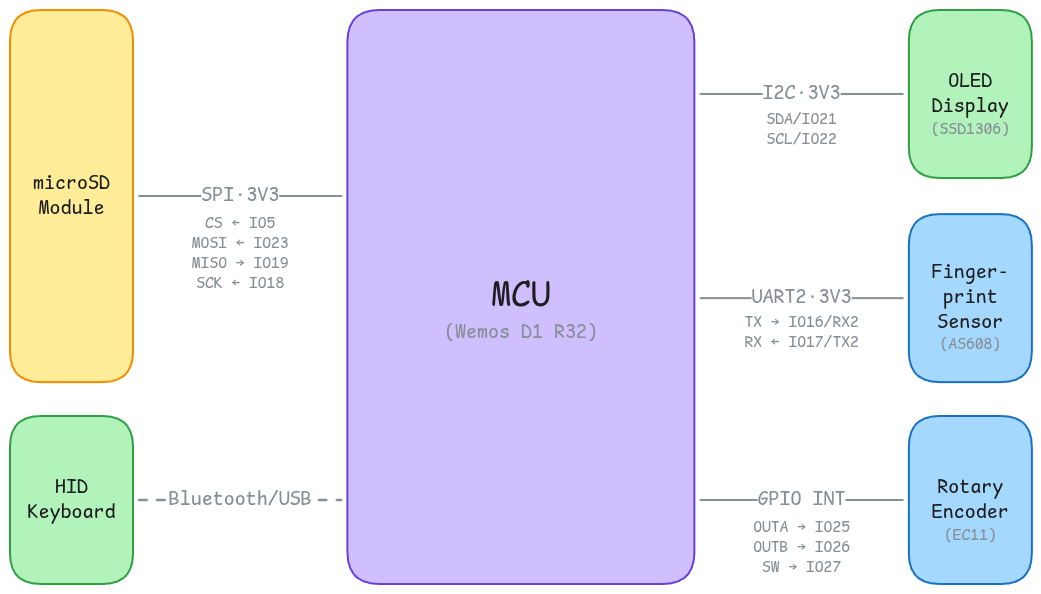
How do the components interact?
The main component of the system is the microcontroller. The Wemos D1 R32 (ESP32-based board) is responsible for orchestrating the entire system, handling user input, managing the display, and communicating with the fingerprint sensor and the microSD card module.
Here is what interfaces with the microcontroller:
- AS608 Optical Fingerprint Sensor: This sensor is used for biometric authentication. It captures the user’s fingerprint and sends the data to the microcontroller for processing and verification. The communication between the microcontroller and the fingerprint sensor is done using a serial interface (UART).
- SSD1306 OLED Display: This display is used to show the user interface and the stored passwords. It communicates with the microcontroller using the I2C protocol.
- Rotary Encoder with Push Button: This component is used for user input, allowing the user to navigate through the menu and select options. The rotary encoder has two pins for the two signals (A and B) and a switch pin for the push button.
- microSD Card Module: This module is used for storing the encrypted passwords on a microSD card. It communicates with the microcontroller using the SPI protocol.
Pin Selection
| Board Pin | Function | Component | Direction | Description |
|---|---|---|---|---|
GPIO16/U2_RX | UART RX | AS608 Optical Fingerprint Sensor | Input | Receives data from the fingerprint sensor. |
GPIO17/U2_TX | UART TX | AS608 Optical Fingerprint Sensor | Output | Sends data to the fingerprint sensor. |
GPIO21/SDA | I2C Data | SSD1306 OLED Display | Bidirectional | Used for data transfer between the microcontroller and the OLED display. |
GPIO22/SCL | I2C Clock | SSD1306 OLED Display | Output | Provides the clock signal for the I2C communication with the OLED display. |
GPIO25 | Rotary Encoder Signal A | Rotary Encoder with Push Button | Input | Receives the signal A from the rotary encoder. |
GPIO26 | Rotary Encoder Signal B | Rotary Encoder with Push Button | Input | Receives the signal B from the rotary encoder. |
GPIO27 | Rotary Encoder Push Button | Rotary Encoder with Push Button | Input | Receives the signal from the push button of the rotary encoder. |
GPIO5 | SPI CS | microSD Card Module | Output | Used to select the microSD card module for SPI communication. |
GPIO18 | SPI SCK | microSD Card Module | Output | Provides the clock signal for the SPI communication with the microSD card module. |
GPIO19 | SPI MISO | microSD Card Module | Input | Used for receiving data from the microSD card module to the microcontroller. |
GPIO23 | SPI MOSI | microSD Card Module | Output | Used for sending data from the microcontroller to the microSD card module. |
Hardware Design
Bill of Materials
| Componenent | Description | Procurement | Quantity | Datasheet |
|---|---|---|---|---|
| Wemos D1 R32 | A microcontroller board based on the ESP32 chip, used as the main processing unit for the password manager. | Sigmanortec | 1 | Datasheet |
| AS608 Optical Fingerprint Sensor | A biometric sensor used for fingerprint recognition to authenticate users. | Optimus Digital | 1 | Datasheet |
| OLED Display | A small display used to show information such as the stored passwords and user interface. | Sigmanortec | 1 | Datasheet |
| Rotary Encoder with Push Button | A rotary encoder used for navigation and selection in the user interface. | Sigmanortec | 1 | Datasheet |
| (Soon) microSD Card Module | A module used for storing the encrypted passwords on a microSD card. | Sigmanortec | 1 | Datasheet |
| microSD Card | A storage device used for storing the encrypted passwords. | Any | 1 | - |
| Jumper Wires | Used for connecting the components together. | - | Too many | - |
| Breadboard/Development Board | Used for prototyping and testing the circuit. | - | 1/1 | - |
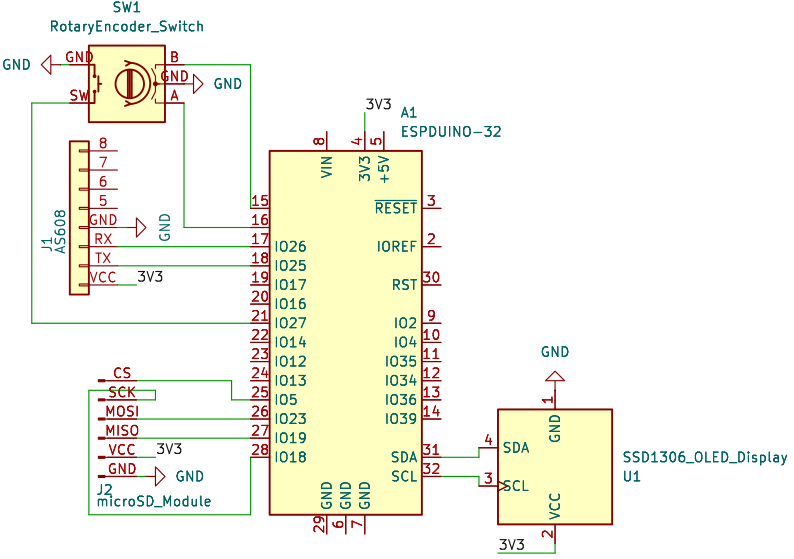
Schematic
Software Design
This project is developed using the PlatformIO environment, which provides a convenient and efficient way to manage the development process, including code editing, building, and uploading to the microcontroller.
In terms of libraries, we have no libraries.
Just kidding, at this moment, the project uses the following libraries:
adafruit/Adafruit SSD1306: A library for controlling the SSD1306 OLED display, providing functions for drawing graphics and displaying text on the screen.adafruit/Adafruit GFX Library: A graphics library for drawing shapes, text, and images on the OLED display.adafruit/Adafruit Fingerprint Sensor Library: A library used for interfacing with the AS608 Optical Fingerprint Sensor, providing functions for enrolling fingerprints, searching for matches, and managing the fingerprint database.- TBD: A library for handling encryption/decryption of the passwords before storing them on the microSD card.
- TBD: A library for handling the file system on the microSD card.
- TBD: A library for bluetooth communication
- TBD: A library for HID keyboard over bluetooth
Software Architecture
The way it is supposed to work is that when the user wants to access their passwords, they will be prompted to scan their fingerprint using the fingerprint sensor. The microcontroller fetches the fingerprint data from the microSD card, compares it with the scanned fingerprint, and if a match is found, it unlocks the password store and lets the user browse through the entries using the rotary encoder. Once the user selects a password entry, the microcontroller sends the password to the connected device via Bluetooth, emulating a keyboard input to automatically fill in the password field on the user’s device.
Results
Conclusions
Bibliography/Resources


